Introduction
This article introduces you to the Breeze Weather app and its core features.
The Breeze Weather app is deployed to customer servers per request. To learn more contact our support at [email protected]!
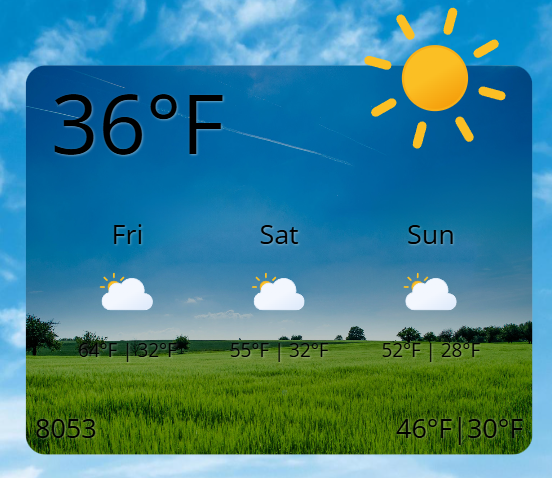
What is Breeze Weather?
Breeze Weather is a lightweight weather widget that displays real-time weather data and forecasts. It features three display modes, 55+ icon sets, and supports 29 languages.
Setting up the widget
Location Settings
- Location ID: Enter the city name or ZIP code (e.g.,
Dallas, TX,75201). - Display Name: Optional custom name to display instead of the resolved city name.
- Country Code: Select the country from a dropdown list. The list also includes U.S. state codes.
Weather Settings
- Widget type: Choose between Forecast (multi-day) and Today (current conditions). Not available in Marque mode.
- Days: Number of forecast days to display (1-5). Only visible for Forecast type or Marque mode.
- Short Form: Use abbreviated day names (Mon, Tue) instead of full names.
- Unit: Select between Fahrenheit (F) or Celsius (C).
- Unit format: Choose display format:
- Normal:
72°F - With Circle:
72° - Just Number:
72
- Normal:
- Language Code: Choose the display language (29 languages supported).
Mode
Select the visual layout for the widget:
- Simple Square
- Simple Vertical
- Marque (Scroll)
Grid-based layout ideal for square widget placements. Displays current temperature, high/low, condition icon, and location name. Supports background images and borders.
Vertically stacked layout for narrow widgets. Forecast items displayed in a list with divider lines. Supports background images and borders.
Horizontal scrolling ticker animation. Continuously loops weather information. Always displays forecast mode.
- Scroll Speed: 60-240 pixels per second.
- Marquee Background Color: Set the ticker background color.
Marque mode does not support background images, borders, or "Today" widget type.
Icon Set
Choose from 55+ weather icon sets:
- Animated: Animated_Blue, Animated_Flat (default), Animated_Lineal
- Colorful: Colorful_3D (1-10), Colorful_Filled (1-4), Colorful_Flat (1-9), Colorful_Lineal
- Black: Black_Filled (1-4), Black_Lineal (1-8), Black_Basic variants
- White: White_Flat, White_Lineal
- Specialty: Realistic (1-4), Smiley_3D, Dark_with_Shadow, Orange_and_Blue, Yellow_and_Blue variants
Customization Settings
Typography
- Font Family: Select a custom font for all text.
- Font Color: Set the text color.
- Font Size: Percentage-based scaling (1-200%, default 100%).
- Text Shadow Color: Shadow effect for text readability (default: semi-transparent white).
Background Settings
Background settings only apply to Simple Square and Simple Vertical modes.
-
Active Background: Choose a preset background theme:
- Desert, Nature_and_Flowers, Ocean_and_Rocky_Coast, Tropical, Urban, Village_and_Countryside (default), or none for solid color.
-
Background Filter: Apply visual effects to the background image:
- Blur (0-20px), Brightness (0-200%), Contrast (0-100%), Grayscale (0-100%), Opacity (0-100%), Saturate (0-200%), Sepia (0-100%), or None.
-
Background Color: Solid background color when Active Background is set to none.
Border Settings
Border settings only apply to Simple Square and Simple Vertical modes.
- Border Color: Set the widget border color.
- Border Width: Border thickness (0-25px, default 0).