JDBC in Wallboard
JDBC (Java Database Connectivity) datasources connect Wallboard to relational databases, fetching data through SQL queries for display in widgets and templates.
- Connect to PostgreSQL, MySQL, SQL Server, Oracle, SQLite, and other databases
- Configure SQL queries to retrieve specific data sets
- Schedule automatic data refresh intervals
- Display live database content on your screens
JDBC integration requires database and SQL knowledge. This feature is intended for custom integration projects and does not come with standard support.
We strongly recommend contacting our support team and requesting professional services before proceeding.
Installing JDBC Drivers
Each database type requires its specific JDBC driver JAR file to be uploaded to the server before creating datasources.
Navigate to Administrator > JDBC Drivers to manage drivers.
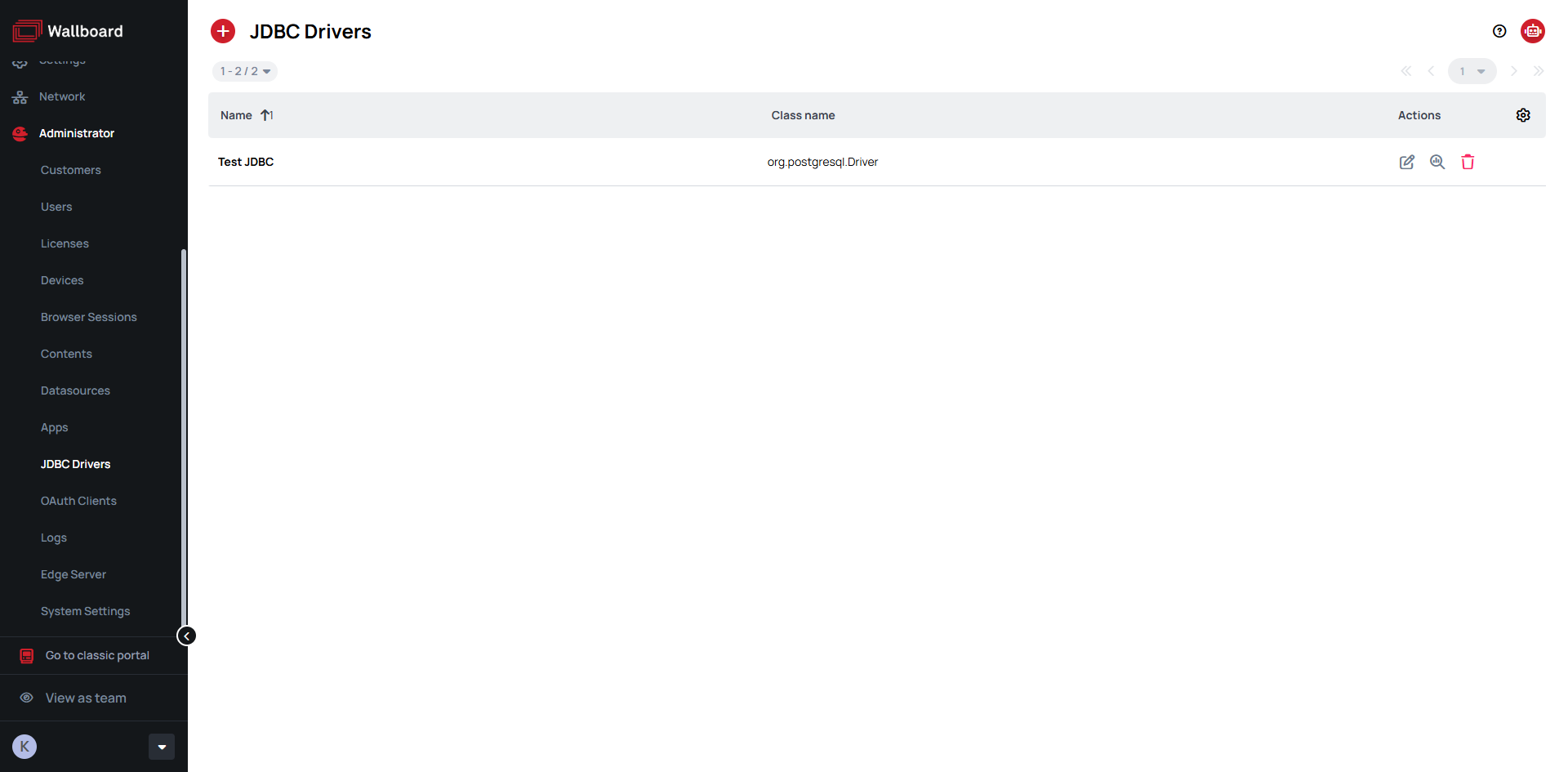
Click the button to add a new driver:
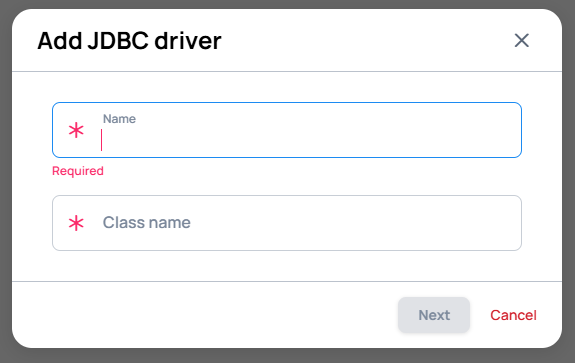
- Driver Name - A descriptive name (e.g., "PostgreSQL 15", "MySQL Production")
- Driver Class Name - The main driver class from the JAR file
- JAR File - Upload the JDBC driver file
Driver Requirements
Each database requires its specific JDBC driver JAR file. Common drivers include:
- PostgreSQL: https://jdbc.postgresql.org/download/
- MySQL: https://dev.mysql.com/downloads/connector/j/
- SQL Server: Microsoft JDBC Driver
- Oracle: Oracle JDBC Downloads
Common Driver Class Names
| Database | Driver Class |
|---|---|
| PostgreSQL | org.postgresql.Driver |
| MySQL 8+ | com.mysql.cj.jdbc.Driver |
| MySQL 5.7 | com.mysql.jdbc.Driver |
| SQL Server | com.microsoft.sqlserver.jdbc.SQLServerDriver |
| Oracle | oracle.jdbc.driver.OracleDriver |
| SQLite | org.sqlite.JDBC |
| H2 | org.h2.Driver |
You can upload multiple drivers for different database types. The system automatically selects the appropriate driver based on the connection URL format.
Creating a JDBC Datasource
Go to Administrator > Datasources click Add new in the External datasource tab > choose JDBC.
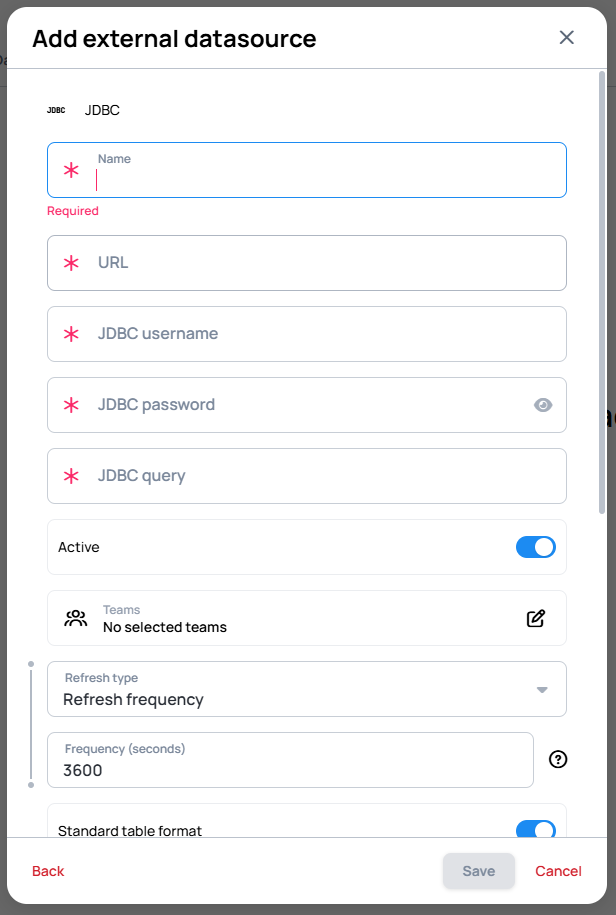
Update Schedule
Configure how frequently the datasource fetches updated data:
- Refresh Frequency - Select a regular interval (every minute, hour, day, etc.)
- Cron Expression - Specify a custom schedule (e.g.,
0 */10 * * * *for every 10 minutes)
- Learn more: External Datasource Refreshing
Database Connection Settings
Connection URL - Enter the JDBC connection string for your database:
| Database | Connection URL Format |
|---|---|
| PostgreSQL | jdbc:postgresql://hostname:5432/database_name |
| MySQL | jdbc:mysql://hostname:3306/database_name?useSSL=false&serverTimezone=UTC |
| SQL Server | jdbc:sqlserver://hostname:1433;databaseName=database_name |
| Oracle | jdbc:oracle:thin:@hostname:1521:SID |
| SQLite | jdbc:sqlite:/path/to/database.db |
Authentication:
- JDBC Username - Database user account with read permissions
- JDBC Password - Corresponding password for the database user
SQL Query
Define the SQL query that retrieves your data. The query result is converted to JSON format for widget binding.
Basic Data Selection:
SELECT id, name, department, salary
FROM employees
ORDER BY name
Filtered Results:
SELECT product_name, stock_quantity, price
FROM products
WHERE stock_quantity > 0
ORDER BY product_name
Aggregated Data:
SELECT department, COUNT(*) as employee_count, AVG(salary) as avg_salary
FROM employees
GROUP BY department
ORDER BY avg_salary DESC
Date-Based Queries:
SELECT order_id, customer_name, order_total, order_date
FROM orders
WHERE order_date >= CURRENT_DATE - INTERVAL '30 days'
ORDER BY order_date DESC
JDBC datasources use standard SQL syntax, not JPQL. Ensure your queries are compatible with your specific database system's SQL dialect.
Connection String Parameters
Additional connection options can be appended to the connection URL for SSL, authentication, and other database-specific settings:
| Database | Example |
|---|---|
| PostgreSQL (SSL) | jdbc:postgresql://host:port/database?ssl=true&sslmode=require |
| MySQL (SSL) | jdbc:mysql://host:port/database?useSSL=true&requireSSL=true&verifyServerCertificate=false |
| SQL Server (Windows Auth) | jdbc:sqlserver://host:port;databaseName=database;integratedSecurity=true |
Once all connection details and query are configured, click Save to create the datasource.
- For optimal performance, use indexed columns in WHERE clauses, limit result sets, and avoid complex JOINs that could impact database performance.
- We recommend creating dedicated read-only database users for Wallboard connections and enabling SSL/TLS where possible.